
THE COWORKING OS PRODUCT
Every part of the day,
in the same place.
The work of running a space moves between money, people, messages and decisions. Coworking OS gives those pieces a shared record you can return to.
Not another tab
to keep updated.
Each area is part of the same application. A tenant is connected to a cabin. A rent record belongs to a person. An enquiry can become an agreement. A message stays close to the work that follows.
01 / TODAY
Start with what
needs you today.
A useful dashboard does more than present numbers. It shows where to look and what might need a decision.
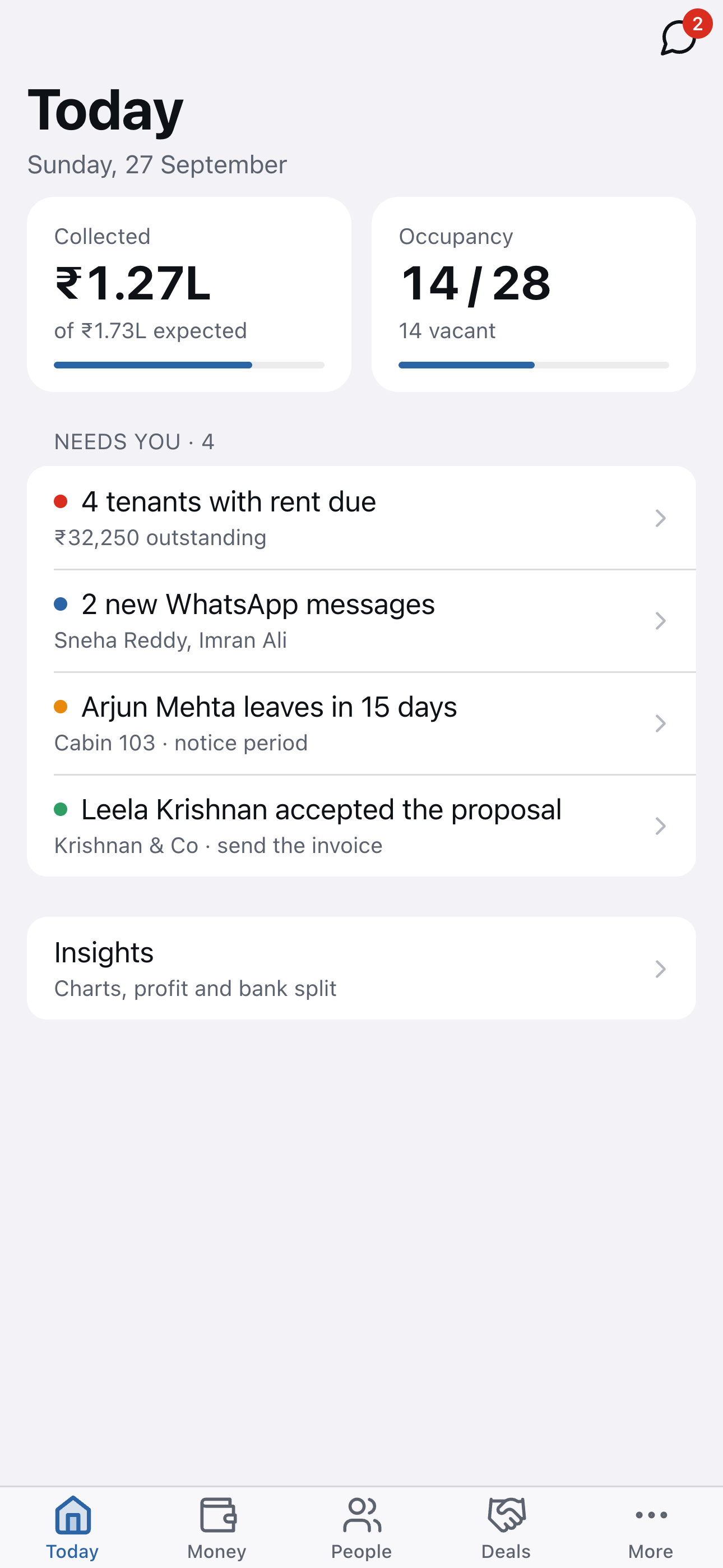
The Today view brings collected rent and expected rent together with occupancy. Below that, it surfaces work such as tenants with rent due, new WhatsApp messages, notice periods and accepted proposals.
That is the point of a daily view: you can check how the space is doing, see what has changed, and open the underlying record without building your own report first.
- Collected and expected rent in one view
- Occupied cabins and vacant space
- Action items connected to their records
02 / MONEY
Know what came in,
what went out and why.
Keep the rent record and the supporting financial work in one place.
Record rent against each tenant, issue invoices and receipts, and see what is collected or outstanding for a selected month. The same area includes expenses and recurring bills, so repeated costs do not need to be reconstructed every month.
When you need to close a loop, pull a tenant statement or look at profit and loss on cash or accrual basis. Payment reminders can go by email or WhatsApp and include the payment link configured for the business.
- Rent, invoices, receipts and outstanding amounts
- One-off expenses and recurring monthly bills
- Tenant statements and cash or accrual profit and loss

03 / PEOPLE
Know who is in
every space.
A tenant record should help you recognize the person and understand the relationship.
Search across names, companies and cabin numbers. See the occupied and vacant spaces, active and past tenants, rent amounts and indicators such as rent due or a coming notice period.
Keep contact details, deposits, rent history and notice terms close to the person’s record. When someone asks a question at the front desk, the context is somewhere your team can find it.
- Active and past tenant lists
- Search by person, company or cabin
- Contact, payment and notice information together

04 / DEALS
Give every enquiry
a clear next step.
Make the pipeline visible from the first question through to an agreement.
Keep leads, proposals and agreements together. See the person or business behind an enquiry, what stage it has reached and what follow-up is expected. A prospect does not have to live in a spreadsheet while their documents sit somewhere else.
When a proposal is accepted, the work can continue into the tenant and occupancy workflow. The product gives a small team a shared view of opportunities without turning the process into a sales department.
- Track leads, proposals and agreements
- See what needs a follow-up
- Carry the relationship into the tenant workflow

05 / INBOX
Keep messages
with the relationship.
WhatsApp is where much of the work already happens. Give those conversations a place in the operation.
Read and reply to WhatsApp conversations inside Coworking OS. The inbox shows the tenant or enquiry context alongside the latest message. That makes it easier to connect “I’ll pay Friday” to the person and the cabin, or understand whether a new prospect is asking about a desk.
Because the conversation lives with the work, teammates can see what was said without asking who has the second phone.
- WhatsApp Business conversations in the app
- Tenant and enquiry context beside the message
- Keep the thread available to the team

06 / EVERYWHERE
The work follows
you around.
The floor does not wait for you to sit back down at your desk.
Use Coworking OS on the web, on the native Android app, or from the iPhone Home Screen. Each version runs the same application, so your day does not split between different tools.
The app saves data on the device and continues to work without a signal. Changes sync when the connection returns. If you turn notifications on, the app can bring a new message, payment or agreement to your attention.
- Web, Android and iPhone Home Screen
- Offline work with changes sent when online
- Optional notifications for important activity

BUILT BY SOMEONE WHO RUNS A SPACE